HOSTINGER Web Hosting Review 2025
Hostinger.com

- Price per month: Starting at $2.99
- Uptime: 99.99%
- Money-back guarantee: 30-day
Is HOSTINGER Worth It?
The Hostinger website builder is a basic site editor built on top of WordPress. You get Hostinger’s high-quality managed WordPress hosting, access to more than 300 themes, and content blocks that you can use to customize your site’s design within WordPress. Overall, Hostinger’s WordPress builder isn’t as flexible or easy to use as a standalone site builder, but it’s one of the best options available if you want to create a website using WordPress.
Overview
What Is Hostinger?
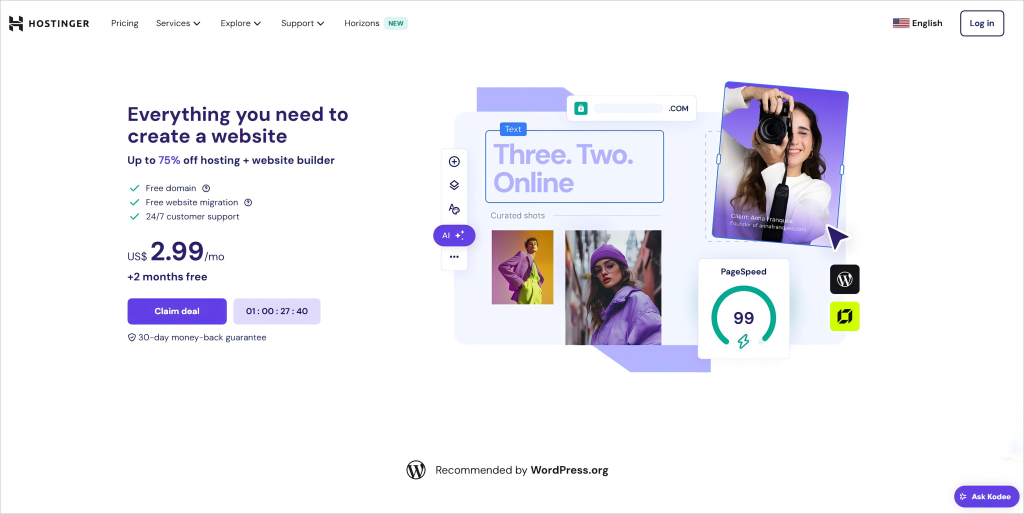
Hostinger is a global web hosting provider founded in 2004 and headquartered in Lithuania. The company is best known for its affordable and reliable managed WordPress hosting plans, which come with WordPress pre-installed and keep your software automatically updated.
Hostinger launched a WordPress website builder to make it easier to create websites with WordPress, even if you have no coding experience. The builder lets you seamlessly switch between adding premade page sections to your site and using WordPress’s standard editor. While it’s not quite as intuitive as a standalone drag-and-drop site builder, it remains one of the simplest ways to build a WordPress-based website.
Using Hostinger
Using Hostinger is straightforward. The company has built a reputation for offering user-friendly services, and that was evident throughout the site setup process. There’s a checklist to guide you when you first log in, and switching between Hostinger’s website builder and the standard WordPress editor is easy. However, if you’re new to WordPress, there might be a small learning curve.
Features
Managed WordPress Hosting
All website builder plans come with managed WordPress hosting from Hostinger. This includes unlimited bandwidth, a free SSL certificate, and a free domain for the first year. Hostinger also automatically keeps your WordPress installation and plugins up to date.
Unlimited Websites
One standout feature of Hostinger’s website builder is that you can create an unlimited number of websites. Each site has its own WordPress dashboard and can be connected to a unique domain name.
How Hostinger Works
How to Create a Website with Hostinger
The process of creating a website with Hostinger is slightly more involved than with some dedicated website builders. First, Hostinger takes you to your hosting dashboard and prompts you to create a new WordPress site. Before you can select a template or begin editing, you must log into the WordPress dashboard.
Inside WordPress, you can choose from over 300 pre-installed themes to kickstart your design. You also have the option to upload and apply any WordPress-compatible theme. However, only the themes provided through Hostinger are fully compatible with the Hostinger site builder. Be aware that changing themes later can be difficult, as you may need to redesign the site layout from scratch.
You can launch Hostinger’s website builder directly from your WordPress dashboard. The editor features premade page sections, each containing multiple elements like text boxes, image containers, buttons, and more. You can customize which elements appear in each section, and several predefined layouts are available for quick customization.
Ease of Use with Hostinger’s Website Builder
We found Hostinger’s builder much easier to use than WordPress’s standard editor, although you still have full access to the WordPress interface if you want it. WordPress’s editor can make it difficult to create sections with different backgrounds or arrange content side-by-side. Hostinger’s builder simplifies these essential design tasks.
However, Hostinger’s website builder isn’t a traditional drag-and-drop editor. Page sections are full-width by default, and there’s no way to individually add or move content blocks freely. You can edit your site’s HTML or custom CSS for more advanced changes, but that’s a feature best suited for experienced users.
One major advantage of Hostinger’s builder is that once your website is created, you can migrate it to another hosting provider just like any standard WordPress site. If you migrate, you’ll lose access to Hostinger’s builder-specific editing features, but all your created pages and sections will remain intact.
Overall, Hostinger’s editor makes building a WordPress site dramatically easier. However, it’s still not a full drag-and-drop experience, and it’s less flexible compared to standalone builders that aren’t built around WordPress.
Adding Multimedia to Your Hostinger Website
Hostinger relies on WordPress’s powerful media management system for handling multimedia — a major advantage for users. We were pleased to see that this robust system is fully preserved.
You can easily upload photos, videos, PDFs, and other common file types from your computer. Bulk uploads are supported. Once uploaded, you can organize your files into folders, add descriptions, and make your library searchable. Hostinger also provides access to a large library of stock images to help you enhance your website’s design quickly.
Overall, we were very satisfied with Hostinger’s multimedia handling — simple, fast, and effective.
Marketing Functionality with Hostinger Websites
Hostinger offers several key marketing tools. First, their websites integrate easily with email marketing plugins such as Mailchimp or Sender. This allows you to collect contacts, segment audiences, and create unlimited email campaigns — often for free depending on the plugin you choose.
Second, Hostinger websites can leverage WordPress’s famous blogging capabilities. You can schedule posts, monetize blogs with ads, and share posts across social media. Conveniently, Hostinger’s builder interface allows you to create blog posts using their predesigned content sections, making content creation smoother and more visually appealing.
SEO Functionality & Add-Ons with Hostinger Websites
Hostinger’s website builder helps enhance your site’s SEO by making it easy to add meta titles and descriptions to your pages. You can also add meta descriptions to images and videos using WordPress’s media manager. All websites have access to the WordPress plugin marketplace, which is filled with SEO optimization tools and add-ons.
One thing missing from Hostinger’s website builder is a built-in traffic analytics dashboard. However, you can easily monitor your site’s traffic by integrating Google Analytics or installing a WordPress plugin.
Ecommerce
Hostinger’s website builder integrates seamlessly with WooCommerce, allowing you to sell an unlimited number of products, digital downloads, and subscriptions. WooCommerce offers tremendous flexibility with built-in tools for customizing product pages, managing shipping and inventory, and running marketing campaigns.
Keep in mind that some of WooCommerce’s more advanced features require paid extensions. Which extensions are included with your Hostinger plan depends on the specific plan tier you choose.
Help and Support
Hostinger offers 24/7 customer support via live chat and email. There’s also a detailed online knowledge base and a learning hub with step-by-step tutorials. While there isn’t a section dedicated solely to the website builder, many tutorials cover building a site with WordPress and Hostinger’s builder tools.
For WordPress-specific questions, you can also find a wealth of support through WordPress’s extensive online community forums.
Hostinger Pricing
How Much Does Hostinger Cost?
Hostinger is known for offering some of the most affordable hosting plans among major providers. However, the rates advertised on the homepage are promotional first-term rates. After your initial term, hosting plans renew at a slightly higher price.
Hostinger requires you to pay for 12-, 24-, or 48-month terms upfront, and there’s no free trial. That said, you can often lock in substantial discounts for your first term.
If you are more tech-savvy and need greater control, Hostinger also offers VPS and cloud hosting solutions.
Bottom Line
The Hostinger website builder makes it easy to create a WordPress website. It provides access to over 300 templates and premade page sections you can add with a click. Plus, it comes bundled with Hostinger’s managed WordPress hosting, so you can build an unlimited number of sites without worrying about software updates.
Ultimately, whether Hostinger’s website builder is right for you depends on whether you want to build a WordPress-powered site. The builder doesn’t offer the same drag-and-drop design flexibility as standalone platforms like Wix. However, you gain access to WordPress’s superior tools for blogging, media management, SEO, and ecommerce — along with the freedom to migrate your site elsewhere anytime. This makes Hostinger a smart choice for individuals and small businesses focused on flexibility, scalability, and long-term growth.